November 23, 2025
CAN Bus Simulation
As you might know from my previous posts, I like to tinker with FMesh to explore how to make the framework better and to squash bugs. Today I want to share one of the first "big" examples I've built: a CAN bus simulation.
Source code: github.com/hovsep/fmesh-examples/can_bus/advanced
What Bus?
If you already know what the CAN bus is, skip ahead. Otherwise, here's a quick intro:
CAN stands for Controller Area Network. It's a protocol that lets microcontrollers talk to each other. It runs in almost every modern car, aircraft, and many industrial devices.
What makes CAN interesting is its simplicity and arbitration: some messages are more important than others. For example, if an airbag decides it needs to explode, all less critical microcontrollers will wait.
CAN uses a bus topology: one writer, many readers. Messages are broadcast to all controllers, including the sender itself. Each controller decides whether to accept the message or ignore it. That's why CAN has no security built in—it's just a reliable wire protocol.
Physically, a CAN bus is just two wires carrying differential voltage signals (high and low). The bus encodes binary data: zeroes and ones. Controllers can encode arbitrary digital messages and send them to peers. For instance, the engine talks to the gearbox, or the entertainment system talks to the main computer.
Simplifications
The CAN protocol has evolved over time. The latest version is CAN FD (Flexible Data-rate), which supports longer payloads and faster bit rates. Implementing all features would take years, so in my toy simulation I focus on the essentials:
3-layer CAN nodes:
- Transceiver: converts bits ↔ voltage
- CAN-controller: converts frames ↔ bits
- Microcontroller (MCU): runs the ECU logic

Other features:
- Bit stuffing
- Arbitration: lower ID = higher priority
- ISO-TP messages on top of CAN frames
And to keep things simple:
- One ISO-TP message = one CAN frame (no multi-frame messages)
- Simplified CAN frame structure: only 3 fields
- "Watchdog" component simulates terminal resistors and halts the bus when all nodes are idle (doesn't exist in reality)
- OBD socket is treated as a CAN node (in reality it's not)
The Data Flow
The demo setup:
- CAN bus with 3 nodes: Engine Control Module (ECM), Transmission Control Module (TCM), On-Board Diagnostics (OBD)
- Laptop connected to OBD
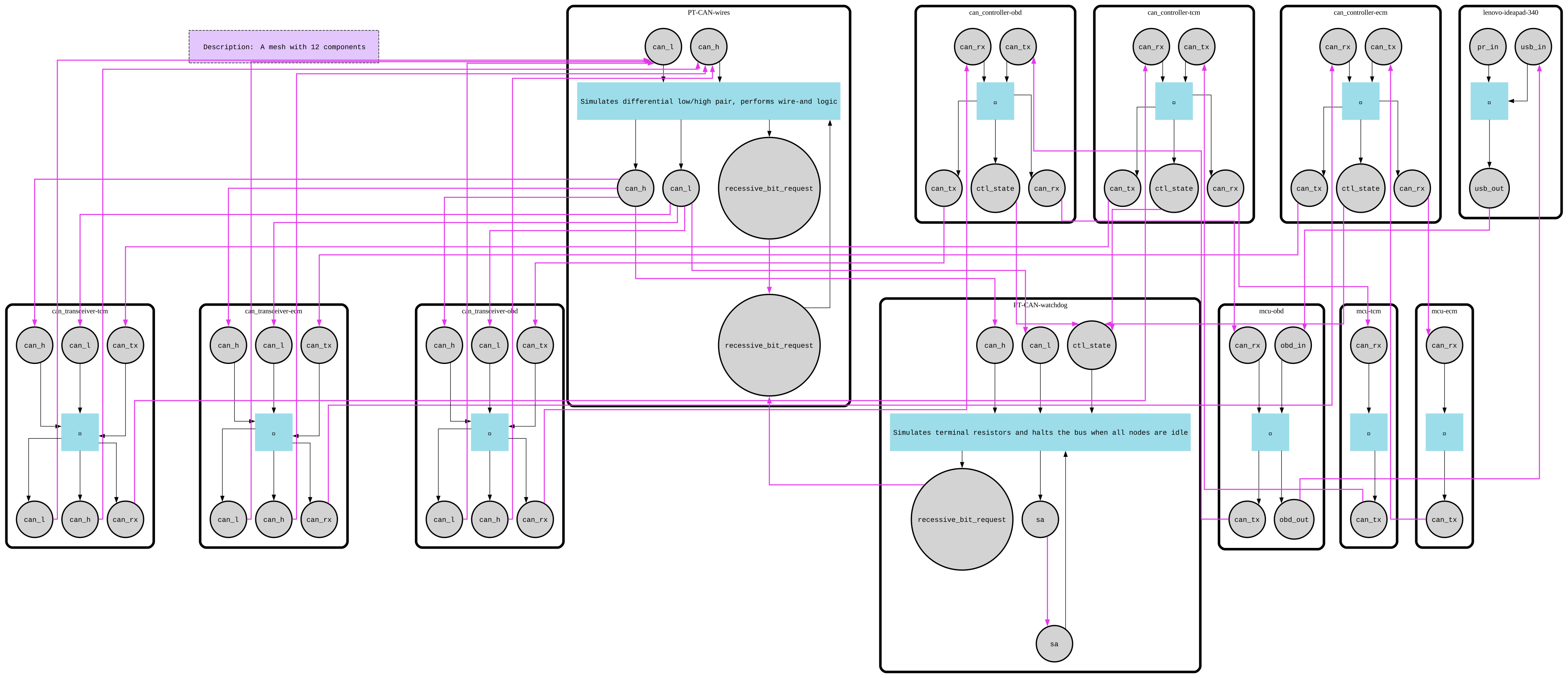
The OBD node acts as a dummy proxy: it transmits everything it receives to the bus.
Let's follow a FrameGetRPM message:
- Laptop sends it via USB
- The OBD node receives it at its
obd_inport - Frame enters the MCU layer of the OBD node. MCU logic is simple: all input frames are forwarded to
cat_tx, which connects tocontroller.can_tx - The CAN controller converts the frame to bits, applies bit stuffing, and adds service bits like IFS (inter-frame space)
- The transceiver converts bits to voltage and drives the bus. It also reads the bus simultaneously
Here's the key: the write (TX) path of OBD is the read (RX) path for all other nodes. Each bit written by OBD is read by all other transceivers, sent up the chain to reconstruct the original frame. That's the essence of CAN: data is transmitted bit by bit and read bit by bit.
The laptop runs diagnostic software that sends multiple messages to OBD:
Logs capture the entire flow—from sending frames to receiving responses.
ECUs
In real cars, there can be tens to hundreds of CAN nodes across multiple buses.
In our simulation, each ECU is simple: it has some state and responds to requests.
The frames sent in main() are actually ISO-15765 / ISO-TP messages (transport protocol over CAN frames).
Why This Matters
Of course, this example is far from a real CAN system (like vcan in Linux). It's more of an educational project—a playground to experiment with CAN, learn the basics of the protocol, and simulate errors or misbehaviors.
For instance, you could add a component called "Magnet" that interferes with the bus, making voltages go crazy and simulating communication noise. Or you could build more ECUs and explore how they interact.
With FMesh, the abstractions feel natural, the signal flow is clear, and you can focus entirely on the domain you care about. That's exactly why I love FMesh.
Full source code: github.com/hovsep/fmesh-examples/can_bus/advanced